This document serves as an internal guide to effectively position and pitch WhatsApp for Lead Generation, including key talking points, a Battlecard for reference, and FAQs to address client queries.
The Battlecard is attached with this document.
 Note: Strictly for internal use ONLY
FAQs:-
1) Monthly maintenance fee (what is the monthly fee all about?)
CV needs to pay Livechat to use Whatsapp on each account ($90/month per integration)
2) Contract Addendum Vs add-on
Option 1 – Add-on Model (like Instant Connect)
Make WhatsApp an optional add-on, similar to Instant Connect, where customers can easily trial it (free or paid) with minimal commitment.
Upside:
• Easy and quick for customers to try and adopt
• Lower friction in getting started
Downside:
• Customers can easily request to switch it off at any time (e.g., “Can we turn off WhatsApp chat?”)
Option 2 – Contract Addendum
Introduce WhatsApp through a contract addendum tied to the existing agreement.
Upside:
• Stronger customer commitment
• Better revenue visibility and relationship depth
Downside:
• Longer approval cycles
• More internal approvals on the client side since it becomes a contractual commitment
3) Do we recommend number provider to use for whatsapp?
This is our recommended number provider to use for whatsapp but client can use any website / vendor:
Get A Virtual WhatsApp Business Number - YourBusinessNumber
4) Can a lead dial the WhatsApp business number directly?
No - there isn’t an option to directly call a WhatsApp business number from within WhatsApp
5) Can a lead copy the number and call it via their phone dialer?
Yes, they can. However, where that call gets routed depends on the configuration set up with your number provider.
For example, the number provider we shared offers two routing options (screenshot attached with this email) depending on how you’d like incoming calls to be handled.
In the below example the “personal phone” is the number used to buy the whatsapp number from : yourbusinessnumber.com
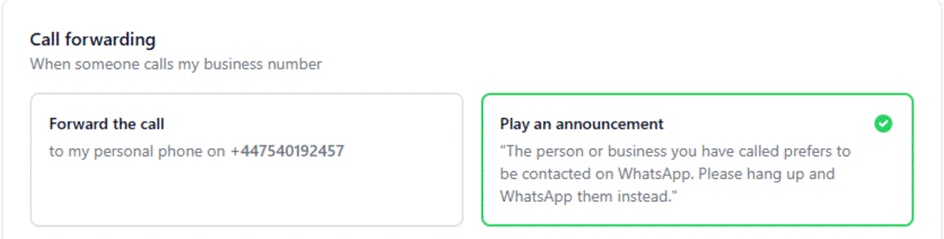
6) Can we repurpose an existing WhatsApp Business number? Is a new number required?
Existing WhatsApp Business numbers cannot be directly reused. They would need to be migrated between Business Solution Providers (BSPs), and such migrations are currently out of scope for our setup.
As a result, a new number is typically required to ensure a smooth and compliant integration.
7) If we do need a new number - using a third party purely to obtain a number feels unnecessary we would prefer to get one directly from number provisioning vendor so that we retain full ownership and control.
Yes, you can obtain a number from a provisioning vendor as long as it is a fresh number and not already tied to a WhatsApp BSP. However, if the vendor also operates as a WhatsApp BSP, numbers provisioned through them may not be compatible with our use case.
Example : Twilio - they provision number as well as are WhatsApp BSPs. We can't work with such numbers.
8) We have big concerns about granting Meta Business access to a Gmail address. Why is a commversion corporate email address not being used. From a security perspective, Meta access is currently blocked for Gmail accounts.
Meta Business access is granted via Facebook accounts, which are often linked to personal email addresses (such as Gmail).
To address security concerns:
- Access is temporary and can be revoked immediately after setup (typically within 30–60 minutes)
- Alternatively, users can add their corporate email (e.g., Commversion email) as a login method to their Facebook account
This approach ensures both ease of setup and control over access permissions.
9) Can our team continue a WhatsApp conversation after it becomes a lead? How can our team continue conversations on WhatsApp if needed?
Once a WhatsApp conversation turns into a lead and is passed into your CRM, your team typically continues communication via email or phone (similar to SmartChat leads).
If you’d prefer to continue conversations on WhatsApp, this can be done using a separate WhatsApp number managed by your sales team for ongoing customer engagement.
10) What happens if the same customer messages again on WhatsApp?
- The conversation is picked up by our team
- Full chat history is available
- We continue assisting the customer and share any updates with your team
11) Can our internal team take over the WhatsApp conversation directly?
No, direct access to manage conversations on the same WhatsApp number is not part of the standard setup.
12) The client says they’ve granted Meta access, but we can’t see the invite, why?
This usually happens due to Meta’s maker-checker process. If there are multiple admins with full control, one admin sends the invite but another admin must approve it before the access is granted. Until this approval is completed, the invite will not be visible on our end.
Additionally, please ensure that the access provided is admin (full control), as partial access is not sufficient for setup.
Note: The client can revoke this access once the setup is complete.
13) Can a client start with one WhatsApp number and later switch to another?
Yes, this is possible, but it requires going through the full onboarding process again, which is not ideal.
Additionally, all data and past chat history are tied to the original number. Switching numbers will result in a loss of previous conversations and any data collected during the trial phase.
14) Clients are seeing a phone number on WhatsApp instead of a name, why is that?
The display name will update once it’s approved by Meta. This approval process typically takes a few hours to up to 5 days.
15) Whatsapp Business Logo Specs:
Dimensions: 640 × 640 pixels (minimum 192 × 192)
Aspect Ratio: 1:1 (square)
File Format: JPG or PNG
Max File Size: ~5 MB
Colour Mode: RGB (not CMYK)
Was this article helpful?
That’s Great!
Thank you for your feedback
Sorry! We couldn't be helpful
Thank you for your feedback
Feedback sent
We appreciate your effort and will try to fix the article